
Every working day at the firm began with the same messages. “What’s happening with my case?” “When will I hear back?” “What else do I need to bring?” They arrived on WhatsApp, mostly in Turkish, but also in English, Greek and Bulgarian. The lawyer and his colleagues knew the answers. They simply had to find them again each time.
For the client, these questions are not idle curiosity. The case decides whether they can stay in the country or start work. So if they hear nothing, they ask again, sometimes putting the question to someone else at the firm. And they write whenever it occurs to them: in the evening or on a Saturday.
The answer was usually short: the documents have been submitted, we are waiting for a letter. But to write it, someone had to look it up in the archive every time. Then the next message arrived. The minutes spent on each two-sentence reply added up day after day, at the expense of the actual legal work.
The archive was not small: about 41,000 documents, 38 GB, built up over the years. On top of that came hundreds of conversations with clients.
The firm in question is one we work with. It handles immigration law, citizenship, company matters and the employment of foreign workers, and most of its clients are foreign nationals. We built AI case management for it. Here we describe what it does, what it brings and, more importantly for the lawyer, what we deliberately did not allow it to do.
What the lawyer asked for, and why a chat bot was not the answer
The lawyer wanted three things: a quick reply for clients, no wrong information in that reply, and no change to his own way of working (folder, Word, Save).
Speed is the easy part: any chat bot replies quickly. “Law firm automation” is often taken to mean a small window on the website that answers in generalities. But clients do not ask general questions. They ask about their own case: have the documents been submitted, has a letter arrived, what is still missing. The answer is in their file and nowhere else. (There is more on the difference between the two approaches in AI agents and chat bots.)
A general answer such as “this usually takes a few months” does not help someone waiting for a specific letter on a specific case. Sometimes it even does harm, because it sounds like a promise.
The second requirement is the harder one. Automatic replies to clients look fine until the first wrong date. A client who receives that date from the firm will plan a trip or a job around it. And the firm will then have to explain why it wrote something that was not true.
The third requirement is just as serious. A firm that has worked one way for years will not change it for a new piece of software, however clever. If the system expects the team to enter every case all over again, the team will abandon it before the first month is out.
We drew the line at the very start. The AI prepares replies to a client only about that client’s own case. It does not give legal advice; that remains the lawyer’s job.
What the firm got
In short: the client gets a quick reply without anyone at the firm digging through the archive for it, and the final word stays with a person at the firm.
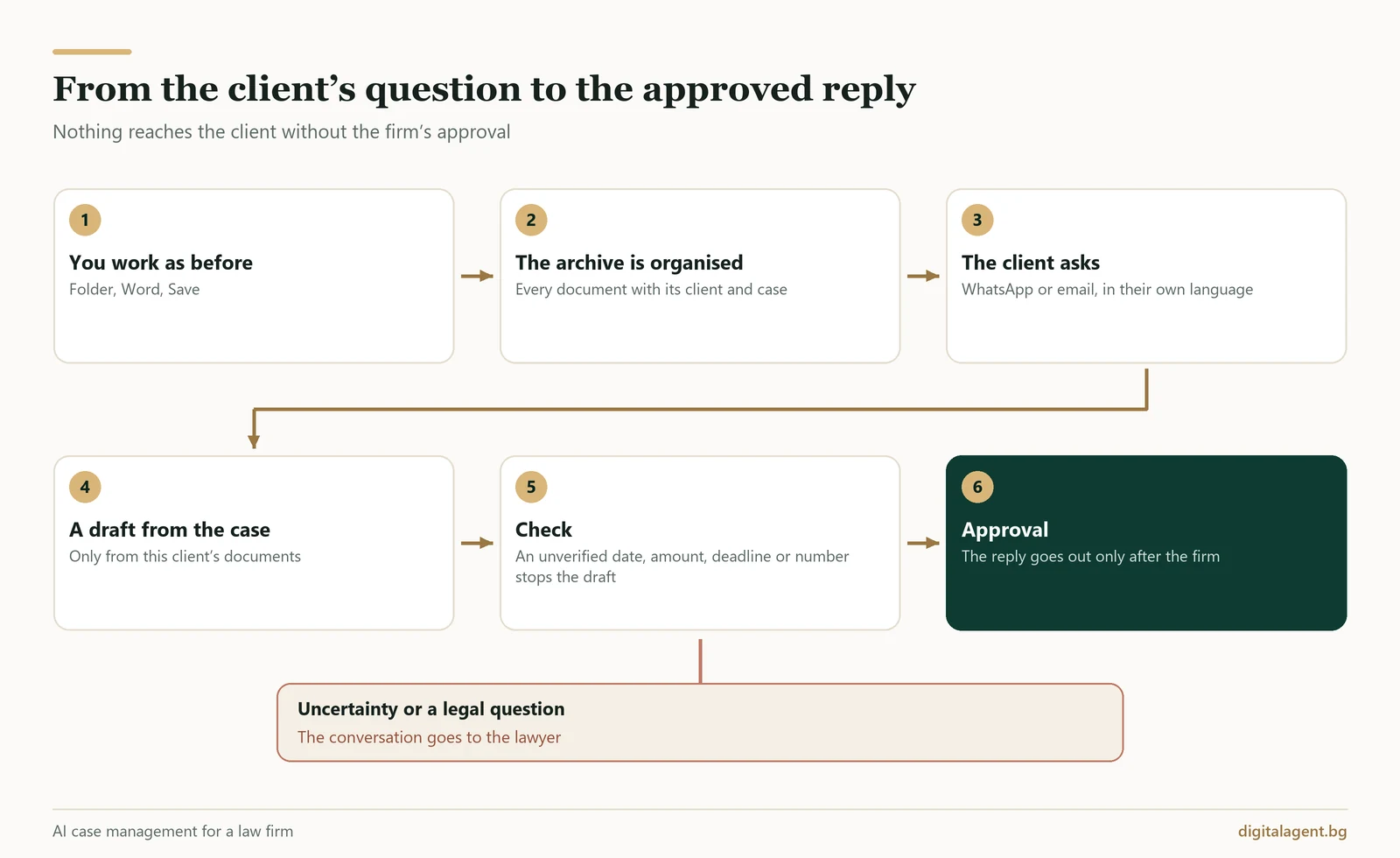
The drafts are prepared by an AI agent. The reply reaches the client where they already write (on WhatsApp and by email), in their language and in the firm’s style.
Language is no small matter. Clients write in Turkish, English, Greek or Bulgarian, and the draft is in whichever language the client used. A client who gets a reply in Bulgarian will run it through a translation app on their phone and may understand something slightly different. In a legal text, “slightly different” is enough to start a fresh round of questions.
Here is how it looks in practice. Say a client writes in Turkish: “What else do I need to bring?” Before the lawyer has opened the folder, a draft in Turkish is waiting in the dashboard, ready to be checked. A member of staff reads it, approves it and the reply goes out. The same applies to messages that come in during the evening or on a Saturday: when the office opens, the drafts are already waiting.
For the client, the change is simple. They write as before and get an answer sooner, because nobody has to dig through the archive first any more.
When a client writes, the member of staff sees the whole history with that client in one place: documents, cases and old conversations. About 41,000 documents are now sorted by client and case: the system proposed about 750 clients and 1,300 cases, and a person at the firm confirms the proposals. The clients’ files also hold 432 old WhatsApp conversations with about 109,000 messages.
About 15,000 of the documents were scanned images only. Now they can be searched like any other text, in Bulgarian, English, Turkish and Greek. If a client rings about a certificate filed years ago, it turns up with a single search, without opening one folder after another.
The inbox is in order too. A letter from a public authority does not get lost among newsletters and invoices, and a new enquiry from a prospective client does not wait for someone to notice it by chance. An email reply goes only to the person who wrote.
The archive is kept in the EU. Document versions are kept for a year, and anything deleted stays in the recycle bin for 60 days. If a colleague deletes a folder by mistake on a Friday, it can be restored on the Monday.
For the lawyer and his colleagues, the difference is the time that went every day into finding two-sentence answers. When the agent has prepared a draft, searching and writing the first version are no longer their concern. What is left is to read and decide. The minutes do not disappear entirely, because every reply is still read, but most of them go back into the work the client is paying for.
The three rules we would not have launched without
Every lawyer’s first question is what could go wrong. We, too, spent more time discussing what the system would not do than what it would. For this firm, the answer comes down to three rules: the client sees only their own case, an uncertain reply does not go out, and a person makes the decision.
The client sees only their own case
Another client’s case cannot appear in a reply to a client. That holds however the question is put. Even if a client asks about a brother’s or a business partner’s case, it stays closed to them. A forged message sent in the client’s name does not open their file either.
This restriction is built into the system itself rather than left to the AI’s judgement. We put this rule first because it concerns professional confidentiality. A quick reply that gives away someone else’s confidential matters is worse than no reply at all.
Better silence than a wrong date
A reply the agent is not sure of does not reach the client. The agent stays silent and passes the conversation to a person at the firm.
Say a client asks when the authority will reply. If the date is not known, the agent does not guess and does not write “within a month”. Someone at the firm checks and replies personally.
For the client, this sometimes means waiting a little longer. For the firm, it means never having to justify to a client a date the AI made up. The client soon forgets the wait, but remembers a wrong date from the firm for a long time.
The same goes for questions that call for legal judgement. If a client asks whether an appeal is worth it, the agent does not answer. That is the lawyer’s job, and the conversation goes straight to him.
A person decides
Today, no reply goes out without the firm’s approval. A member of staff reviews the draft. If everything is in order, they approve it. If not, they take over the conversation and write the reply themselves.
Later on, the firm may decide to let some replies go out without approval, but only once it has been proven that no client can see another client’s case. The decision is the firm’s, because it is the firm that answers to the client.
Client data security: how we protect it
For a lawyer, confidentiality is a professional duty. That is why our conversations about GDPR and AI always start with two questions: where is the data held, and who has access to it. The firm remains the controller of its clients’ personal data, and we process it under a contract with the firm.
What we did:
- the archive is kept in the EU;
- clients’ data stays under the firm’s control and is not used to train AI;
- a log shows who opened and approved what;
- login uses two-factor authentication, and backups are made every night with their restore checked automatically.
If a client asks where their documents are kept, the firm can give a specific answer.
The system is monitored around the clock, and we know straight away if there is a problem. Behind it are more than 1,000 automated tests and an independent security review. In the demonstration you will see the dashboard with sample data. We do not show real client data to anyone, not even to explain how the system works.
What stays the same: the team’s habits
New software for a law firm usually means the team learning it in the evenings after work. That is what we wanted to avoid. The lawyer works as before: opens the client’s folder, writes in Word and presses Save. Nothing is entered twice.
The way the firm talks to its clients has not changed either. The tone of the replies is the firm’s own. If a draft does not sound right, the member of staff does not approve it and writes the reply themselves.
The phone stays too. The firm still writes to clients from WhatsApp Business on its phone, as before, and a client never gets two replies to one question. If WhatsApp Business is your main channel with clients as well, your routine can stay the same.
What is new is the dashboard where the team sees everything that needs a human decision. When the lawyer is in court, a colleague in the office takes over the conversations. The dashboard is kept simple so that it does not distract from the work.
The benefits of both stages: what works now and what comes next
The first stage is built and in use. The second is agreed and, in our view, it is the more interesting part.
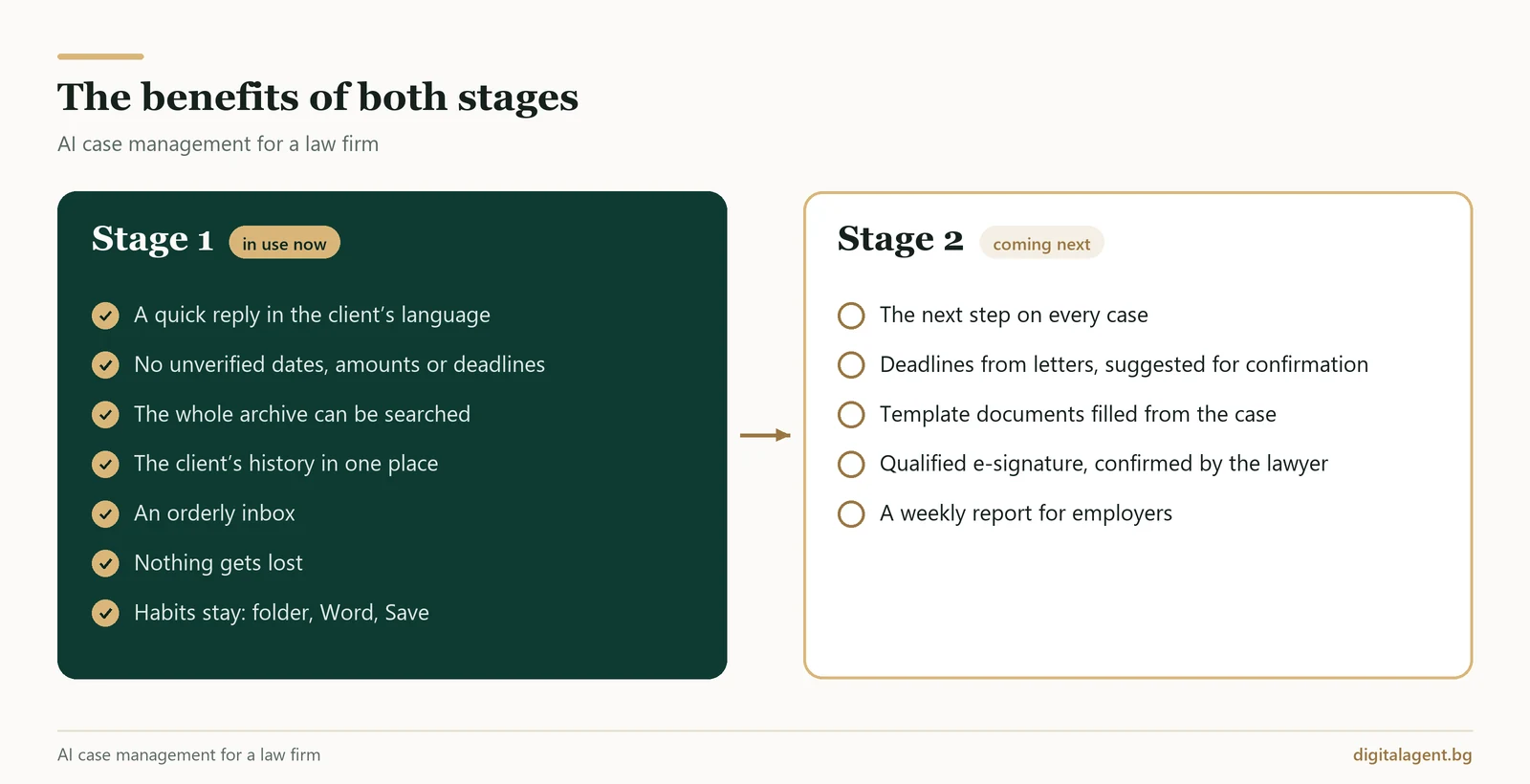
The first stage solves the problem we started with. The minutes someone spent searching the archive for a two-sentence answer go back into legal work: the draft is already prepared, and all that is left is to read and approve it. The client gets an answer sooner and in their own language, and a date or amount that is not in the documents of their case never reaches them. A document from years ago, even a scanned one, turns up with a single search, and a letter from an authority does not get lost in the inbox. The team’s habits stay the same: folder, Word, Save.
The second stage will move from clients’ questions to the work on the cases itself: so that no step or deadline is missed and data does not have to be retyped by hand.
The case management system will also know the types of procedure. About 27 types are planned, including citizenship, origin, residence, companies, labour migration, court cases and debt collection. For every case you will see which step it is at, what comes next and by when. So the firm will answer “What’s happening with my case?” at a glance, and a colleague will be able to take over a case without questioning the lawyer and without missing a step.
Letters from public authorities will be read and the system will suggest a deadline. A suggested deadline will only count after a person at the firm confirms it. That way the deadline will no longer depend only on whether someone read the letter carefully on a Friday afternoon.
Template documents will be filled in with the case data. Names, dates and numbers will no longer be retyped by hand, and retyping is exactly where the most tedious mistakes happen.
Documents will be signable with a qualified electronic signature directly through the system. The decision stays with the lawyer: every signature will wait for his confirmation and will never happen automatically.
A “Labour migration” module is also planned. In it, the submitting party will ask only about its own workers, and the employer will receive a weekly report. For the firm, that will mean fewer calls asking “where are we?”.
We will write about it in detail once the second stage is in use.
Frequently Asked Questions
Can a client see other people’s data?
Does the AI reply to clients on its own?
Will I have to change the way I work?
Where is the data stored?
What happens if the AI does not know the answer?
Does it work with WhatsApp on my phone?
If you run a law firm and recognise the situation, get in touch. We will show you AI case management working live. You can book a demonstration directly or email info@digitalagent.bg.
Digital Agent (AI AVTOMATIZATSII OOD) is a specialist agency for AI automation, AI agents and integrations. We build practical, durable solutions for hotels, restaurants, online shops and B2B companies in Bulgaria, Greece and Romania.