
Claude (pronounced “Klod” in Bulgarian) is the AI assistant from the American company Anthropic, and you can use it for free at claude.ai in your browser and in the apps for Windows, Mac, iPhone and Android. Write to it in Bulgarian and it replies in Bulgarian: it summarises documents, writes texts and analyses files, although the menus are not yet available in Bulgarian. As of October 2026, Claude is officially available in Bulgaria, the free plan costs €0 and Pro costs €18 a month excluding VAT (around €21.60 with 20% VAT).
The information in this article comes from Anthropic's official pages and public sources as of 28 October 2026. At Digital Agent we build AI agents for businesses, so in the second part we explain what Claude offers for agents and multi-agent systems.
What Claude is and how it handles Bulgarian
Claude is a large language model (LLM) from Anthropic, and the company uses the same name for its chat app. If you are searching for “Claude artificial intelligence” rather than Claude Monet or Claude Debussy, this is the Claude you mean.
Anthropic offers four main models. For most tasks the company recommends Claude Opus 5.5, released on 22 September 2026. Claude Fable 5.1 (1 September) is the slowest and is meant for the hardest tasks that need long reasoning. Sonnet 5.5 (28 September) balances speed and quality, and Haiku 5.5 (7 October) is the fastest. Artificial Analysis is an independent company that compares models. As of 28 October, Opus 5.5 leads its index with 58 points in maximum reasoning mode, and Sonnet 5.5 has 54 points in the same mode. The ranking does not measure Bulgarian. The models' knowledge runs to June 2026, so for more recent events ask Claude to search the web. The free plan gives you Sonnet 5.5 and Haiku 5.5, while Opus and Fable come with the paid plans. We compared their API prices (programmatic access for developers) in our article on AI models and API prices for business.
Claude's interface is available in 11 languages, including English, German and French, but according to Anthropic's page on supported languages , Bulgarian is not one of them. You can still chat in any language, whatever language the menus are in. Voice mode is in beta and has a separate language setting (Settings → Capabilities). Anthropic does not publish a list of the languages voice mode supports, so check in the app whether Bulgarian is one of the options.
Anthropic says Claude works with most languages that use standard Unicode characters, though quality varies by language. Bulgarian is not in the table of results by language that the company has published, and we found no independent measurement of Bulgarian for the 5.5 series. So test it yourself with your own texts. Anthropic recommends writing in Cyrillic rather than in Bulgarian typed in Latin letters (known as shlyokavitsa), and explicitly stating the language you want the reply in, for example “Reply in Bulgarian”.
How to get started with Claude: in the browser, on your computer and on your phone
Signing up takes four steps:
1. Open claude.ai and sign in with a Google account or an email address. 2. Enter your mobile number and the code from the SMS. You cannot skip this step or change the number later, and virtual and landline numbers are not accepted. 3. Confirm that you are 18 or over: Claude's personal plans are for adults only. 4. Write your first message and add “Reply in Bulgarian”.
You can download the desktop app for Windows, macOS and Linux (beta) from Claude's official download page. On your phone, search for “Claude by Anthropic” in the App Store (iOS 18 or later) or on Google Play (Android 8.0 or later). Chat in the apps is also available on the free plan.
You change the menu language in your profile's language setting, and you hold the conversation itself in Bulgarian. The browser, the desktop app, the phone and Claude Code share one usage limit, so it makes no difference where you write from.
What Claude can do: from chat and files to Claude Code
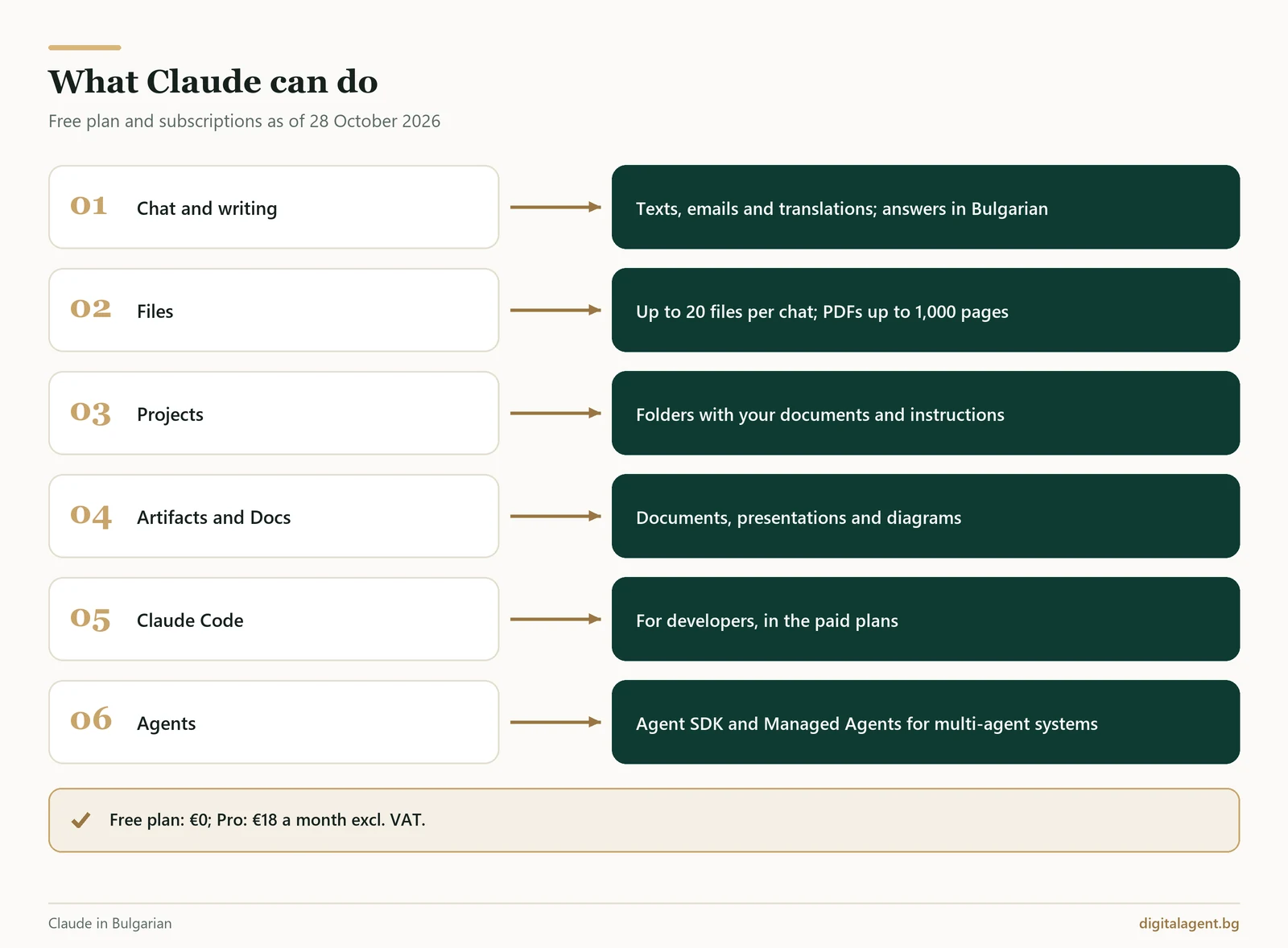
The main features:
- Chat and writing. Answers, texts, emails, translations and ideas.
- Files. Up to 20 files per chat and up to 500 MB per file: PDFs of up to 1,000 pages, Word, Excel, CSV and images.
- Projects. Workspaces with their own documents, instructions and history. The free plan allows up to 5.
- Artifacts, Claude Design, Slides and Docs. Documents, presentations, diagrams and interactive visualisations in a separate panel. Artifacts are included in all plans. Docs, Slides and Design have left beta and have been on the free plan too since 8 October 2026. Claude does not create photos or illustrations the way specialised image tools do, but it can analyse images you upload.
- Web search. Included on the free plan as well. The in-depth Research mode is for paid plans.
- Voice mode. A beta feature on all plans, most convenient on your phone.
- Memory. Claude remembers context between conversations; on personal plans memory is on by default.
- Connectors. Connections to Gmail, Google Calendar, Google Drive and other apps; Anthropic's catalogue lists 1,030 connectors.
- Delegating tasks (Cowork). On Pro and Max you hand Claude a longer task, including on a schedule, and it keeps working even after you close your laptop.
Two more features come only with the paid plans. The Claude in Chrome extension has been able to read pages, fill in forms and click for you since 26 August 2026. Claude for Microsoft 365 works in Excel, PowerPoint, Word and Outlook.
Claude Code: what it is, where it runs and what it costs
Claude Code is Anthropic's tool for developers. It runs in the terminal, in VS Code and JetBrains, in the desktop app and in the browser: it reads the project's code, edits files and runs commands. It is included in all paid plans, from Pro (€18 a month excluding VAT) upwards, and shares the usage limit with chat.
Lesser-known Claude features
Three features that rarely get written about:
- Incognito chat. In a new chat, the ghost icon at the top right opens a conversation that is not saved to your history or memory and is not used for training. It is available on all plans, but not inside projects.
- Memory controls. Since 25 August 2026 you can edit and delete the topics Claude remembers, and sensitive topics stay out of memory unless you allow them.
- Connectors with approval. In Gmail, Calendar and Drive, Claude needs your confirmation by default before it sends, replies or moves anything to the bin.
Is Claude free and how much does it cost: prices as of October 2026
Yes, Claude has a free plan. Every plan has a usage limit that resets every five hours, and the paid plans also have a weekly limit. Anthropic does not publish a fixed number of messages: it depends on the length of your conversations, the model and the features you use. The free plan's limits change often, so this description reflects 28 October 2026.
The prices are taken from Claude's official pricing page, viewed from Bulgaria on 28 October 2026. They are shown excluding VAT. For personal plans, the approximate amount with 20% VAT is given in brackets.
| Plan | Price per month | What you get |
|---|---|---|
| Free | 0 € | Sonnet 5.5 and Haiku 5.5, search, files, memory, Artifacts, up to 5 projects |
| Pro | €18 (€21.60); €15 with annual billing | At least 5 times the usage limit, Opus 5.5, Claude Code, Research, scheduled tasks, Chrome, Microsoft 365 |
| Max | from €90 (from €108), monthly only | 5 or 20 times the Pro limit, priority at busy times |
| Team Standard | €21.04 per user; €18 with annual billing | 2–150 users, SSO (sign-in with your company account), content not used for training by default |
| Team Premium | €105.23 per user; €90 with annual billing | 5 times the Standard limit |
| Enterprise | US$20 per user + usage at API prices | Minimum 20 users, SCIM (automatic adding and removal of users), audit logs |
In US dollars, Pro costs $20 a month or $17 with annual billing. Max costs $100 (5x) or $200 (20x). Team Standard and Premium cost $25 and $125 per user per month.
VAT is charged according to your billing address, and claude.ai/upgrade shows the exact amount before you confirm. A company can add its VAT number to the account. In the European Economic Area you have 14 days to cancel and request a refund through the app.
Privacy: what to set up and what not to paste into the chat
On the personal Free, Pro and Max plans, you decide whether your conversations can be used to train the models: click your name, then Settings and Privacy, as described in Anthropic's guide to privacy settings. If you allow training, your conversations may be kept in de-identified form for up to 5 years. If you turn training off, a deleted chat is removed from the servers within 30 days. Thumbs-up and thumbs-down ratings are kept for 5 years and may be used for training even when the setting is off.
For companies, something else matters more. Anthropic's consumer terms for the European Economic Area contain a “non-commercial use only” clause, so a personal account is not meant for company data. Team and Enterprise run under the commercial terms. By default, content on those plans is not used for training, and Anthropic processes the data as a data processor under contract. According to Anthropic, data from its business services is stored in the US.
Anthropic advises thinking twice before you paste sensitive data. In a personal account, do not paste:
- customers' personal data: personal identification numbers (EGN), phone numbers, addresses, booking or health details;
- passwords, API keys and access codes;
- bank account and card details;
- unsigned contracts and unpublished financial results;
- employee data: salaries, performance reviews, sick leave.
If AI has to work with your customers' data every day, the safer route is a solution with a data processing agreement, clear access rights and a person who approves the important steps.
Claude or ChatGPT: the practical differences
The official pages show clear differences. ChatGPT has a Bulgarian interface and creates images even on the free plan. You can also try it without an account, and it has a cheaper paid plan (Go). Claude does not create photos or illustrations. It requires an account with a phone number, you must be 18 or over, and Pro costs €18 a month excluding VAT. On the free plan, however, Claude accepts up to 20 files per chat, whereas free ChatGPT accepts 3 files a day.
Interest in Claude in Bulgaria is growing. According to Google Keyword Planner, “claude” was searched an average of 74,000 times a month between October 2025 and September 2026, up 814% year on year. Statcounter data for September 2026 shows that around 0.7% of the visits that AI assistants send to websites in Bulgaria come from Claude. ChatGPT accounts for 80.9% and Gemini for 14.5%. These figures count referrals, not users, and say nothing about quality.
You can find a comparison of popular AI assistants in our article AI in Bulgarian: chat with artificial intelligence for free, and for Google's assistant see Gemini in detail.
Prompts for Claude: ready-made templates for business
A prompt is the written instruction you give Claude. Each template below uses a specific Claude feature. Replace the parts in square brackets, and remove any personal data before you paste in text from a customer.
| Task and feature | Prompt to copy |
|---|---|
| Company folder (Projects, also on the free plan) | In the project instructions: You reply on behalf of [company] to customers and guests, in the language they write in, in up to 100 words and only from the documents in the project. If the answer is not in them, say so and suggest [email]. Below every reply in a foreign language, add a translation into Bulgarian. |
| Reply to a negative review (in the same project) | A customer wrote this review: [text]. Write a reply of up to 80 words: thank them, acknowledge the specific problem without arguing, say what we will change and invite the customer to write to us. |
| Quote as a document (Artifacts and Docs) | Create a quote as a document for [company] for [service] using only these prices and terms: [list]. Include what the service covers, the price excluding and including VAT, the timeframe and the next step. If information is missing, ask me instead of guessing. |
| Contract summary (PDFs of up to 1,000 pages) | Summarise the attached contract in 10 points: parties, subject matter, deadlines, price and payment, penalties, termination, automatic renewal. Flag the clauses that are unfavourable to us, with their clause numbers, and list questions for a lawyer. |
| Sales analysis (Excel or CSV) | I am attaching the sales figures for [period]. Show the five services with the highest revenue, say which of them are down on [previous period], and make a chart. |
| Competitor research (Research, paid plan) | Research [3–5 competitors] in [city]: services, published prices, and what customers praise and criticise. Make a table with sources and suggest three ways we could stand out. |
| Posts for the month (Artifacts) | Create a calendar of 8 Facebook and Instagram posts for [business] for [month]: date, occasion, text of up to 60 words and a photo idea. Do not make up discounts or dates. |
| Scheduled task list from meetings (Cowork, Pro and Max) | Every Monday at 9:00, collect last week's meeting notes from [folder] and make a table: task, owner, deadline. If a deadline or owner is missing, leave the field blank and list it at the end as an open question. |
If you write the same replies to customers dozens of times a week, an AI agent could take over that work and reply directly in your website chat or over the phone.
Claude AI agents and multi-agent systems for business
In a chat, you ask, Claude answers and you take the action. An AI agent carries out the steps itself: it checks data in a system, fills in a document, records a booking and reports what it has done. A multi-agent system splits one job between several agents. One agent answers the customer and a second checks stock and prices in the company's systems. A third prepares the contract or invoice, and an employee approves the important steps before anything reaches the customer. You can read more in our article on the difference between an AI agent, an assistant and a chatbot.
Anthropic offers several tools for building Claude agents. The Claude Agent SDK (called the Claude Code SDK until September 2025) is a toolkit developers use to build agents on top of Claude Code. Examples include agents for finance, for customer service with handover to a member of staff, and for research. With Claude Managed Agents, Anthropic runs the agents on its own servers. The service has been in public beta since 8 April 2026, and coordination between multiple agents was added in May. For low-cost helper agents, the company recommends using Haiku 5.5 alongside Opus 5.5 or Sonnet 5.5.
Anthropic's guidance from January 2026 advises starting with one well-built agent. According to that guidance, several agents use roughly 3 to 10 times more tokens for the same task. Tokens are the units of text that a model's work is billed in. Several agents are worth it when a task means reviewing many documents and returning only what matters, when parts of the work can run in parallel, or when many different tools are needed. They are not worth it when the steps are closely linked or when the work is split by job role. In those cases the agents spend more on coordinating than on the work itself. In Anthropic's Project Vend experiment, a “manager” agent had many of the same weaknesses as the shopkeeper agent because it ran on the same model. Discounts fell by about 80%, but the manager approved requests for lenient treatment of customers about eight times as often as it refused them, and it tripled refunds. That is why a person still checks the important decisions.
For a small business, one agent for website enquiries is often enough. Several agents make sense when the process runs through several systems and documents: a conversation with the customer, a check in a booking system or CRM (customer relationship management system), a document and an approval. If an agent talks to your customers, since 2 August 2026 the EU AI Act has required that it is clear from the first contact that the customer is talking to an AI.
At Digital Agent we design and build AI agents and multi-agent systems with Claude and other leading language models. We choose the model to suit the task and the budget, and we connect the agents to the systems the company already uses. Our article on multi-agent systems and AI agent orchestration explains how work is split between agents and where human approval stays in place.
What we can build for your business with AI
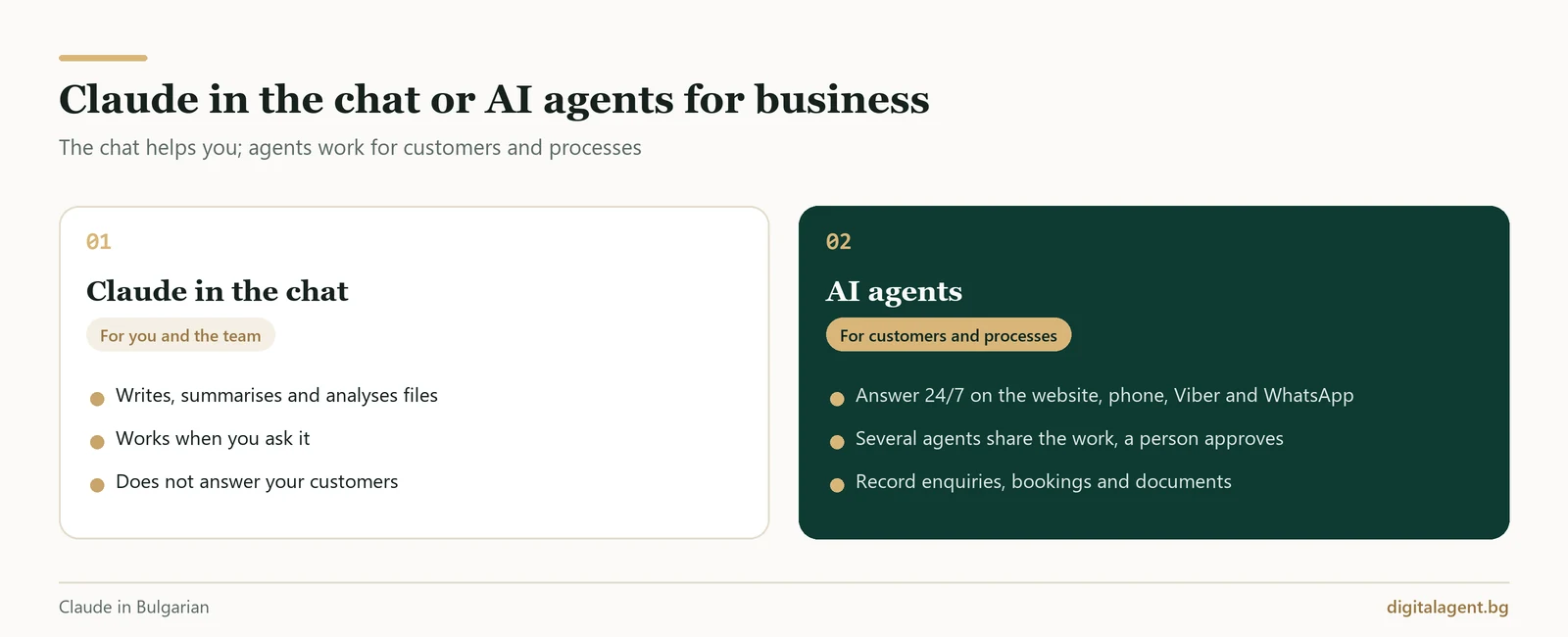
Claude in the browser helps you and your team write, summarise and plan. An AI agent works for your customers. It answers on the phone, in chat and in messaging apps according to your rules and records the result in your systems. Here is what we build:
- An AI chat agent on your website. Answers from your prices and documents, guides the customer to an enquiry or booking and records the enquiry with an AI summary of the conversation.
- AI voice agent on the phone. Speaks natural Bulgarian on a real phone line and replies in about a second on average. It books an appointment or reservation after the customer explicitly confirms it. If the call is transferred, the member of staff can see what the customer wanted. In the 30 days to 28 October 2026, our voice agents handled nearly 7,000 calls on the phone lines of real hotels.
- An agent in Viber and WhatsApp. Replies to customers on the apps where they already send messages. A member of staff can take over the conversation at any time, and the agent then goes silent.
- AI agent for hotels. Creates and changes bookings directly in the hotel's property management system (PMS). It also sends confirmations and messages during the stay by WhatsApp, Viber or email.
- AI automation of routine tasks and documents. Takes over the confirmations, reminders and enquiry handling that someone on your team does by hand today.
- AI case management for a law firm. Prepares a draft reply to a client from the documents in their case, in the client's language. A member of staff approves every draft, and the agent does not show a client other clients' cases.
We do not have a public demo, but on request we can set up a demonstration call with the voice agent through the page for a free consultation with Digital Agent.
Frequently Asked Questions
Is Claude free?
Does Claude work in Bulgarian?
How much does Claude Pro cost in Bulgaria?
Claude or ChatGPT: which should I choose?
What is Claude Code and do I need it?
Can I use Claude AI to build AI agents and multi-agent systems for my business?
book a free consultation: we will pick the process that takes up most of your time and discuss which parts of it an AI agent could take over.
Digital Agent (AI AVTOMATIZATSII OOD) is a specialist agency for AI automation, AI agents and integrations. We build practical, durable solutions for hotels, restaurants, online shops and B2B companies in Bulgaria, Greece and Romania.