
Gemini is Google's AI assistant, which you can use for free with an ordinary Google account at gemini.google.com and in the Gemini app for Android, iPhone, Windows and Mac. You can type or speak to it in Bulgarian without changing any settings, and it answers questions, summarises documents, translates, creates images and researches topics online.
Google changes its free limits often, so we state when we checked the details: 28 October 2026. If you are looking for the Gemini crypto exchange or a repair shop called Gemini, this article is not about them.
What Gemini is and what changed in autumn 2026
Gemini is the name of both the app and the family of Google language models behind it. If the term "language model" is new to you, start with our guide to what artificial intelligence is. According to Alphabet's report for the second quarter of 2026, the app has 950 million monthly active users. In Bulgaria, according to Statcounter, Gemini's share of the visits that AI chats send to websites jumped from 1.1% in September 2025 to 14.5% in September 2026.
Since 9 October, accounts without a subscription have run in "Auto" mode. Most questions go to the fastest model, Flash-Lite, while harder ones may be passed to Flash or Pro. On 13 October the newest model, Gemini 4 Argon, became available to Google AI Pro and Ultra subscribers. We look at how it ranks against the others in our comparison of AI models for 2027 . Since July, NotebookLM has been called Gemini Notebook: you upload your own documents and ask questions based on them alone.
How to use Gemini in Bulgarian: phone, computer and web
Google officially supports Bulgarian in Gemini: you write in Bulgarian and get the answer in Bulgarian. The language setting only changes the menus, the notifications and the language of voice commands.
- Web: open gemini.google.com in your browser and sign in with a Google account. The menus follow the browser's language.
- Android: download Gemini from Google Play (Android 9 or later, at least 2 GB of RAM). To change the language, go to your profile picture → "Settings" → "Languages".
- iPhone and iPad: you need iOS 16 or later, and the app follows the device's main language (Settings → General → Language & Region).
- Computer: the Windows 10 and 11 app opens over any window with Alt+Space, and the Mac app (macOS 15 or later, Apple Silicon) with Option+Space.
In Bulgaria, you can use Gemini with a personal account that you manage yourself from the age of 16 (in many other countries it is 13). Younger children can use it only in the mobile app and only with an account managed by a parent through Family Link. Paid plans and many features are for adults only.
Gemini instead of Google Assistant on Android
Some new Android phones come with Gemini as the default assistant, while on others Google Assistant offers to switch you to Gemini, which then replaces it. Because "Hey Google" does not work in Bulgarian, you call up Gemini by holding the power button or the Home button, or by swiping up from a bottom corner of the screen.
Which Gemini features do not work in Bulgaria (as of 28 October 2026)
- Gemini built into Chrome for desktop is not available in the EU. The gemini.google.com website works normally in Chrome.
- Tasks in Gemini (formerly Gemini Spark) and Personal Intelligence, which connects Gmail, Photos and YouTube, are not available in the European Economic Area (EEA).
- Uploading your own video for editing in Gemini Omni is not available in the EEA.
- According to Engadget, Gmail's smart features are switched off by default in the EEA and can be turned on in the settings.
What Gemini can do: chat, voice, images, files and research
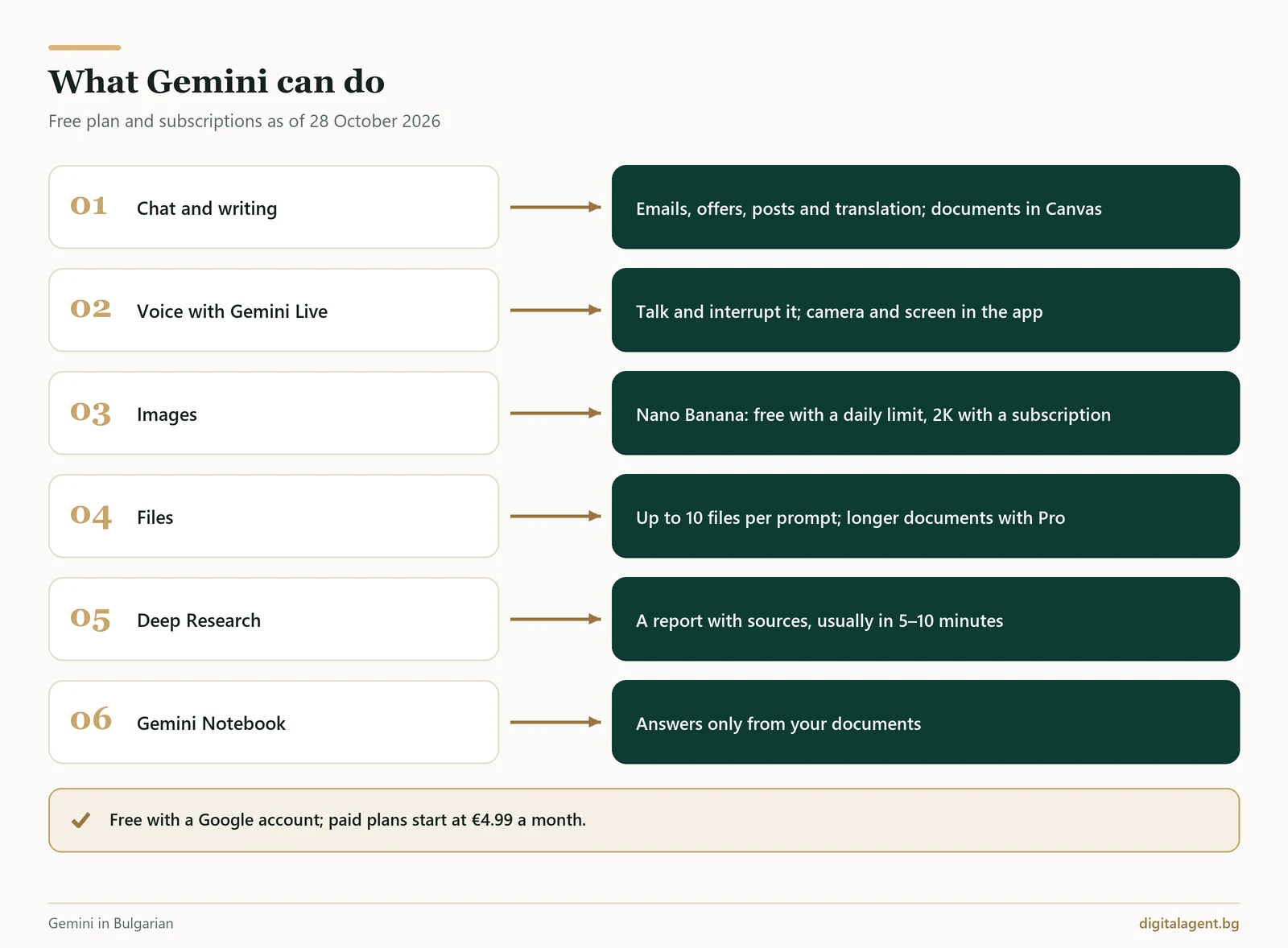
Chat and writing. Gemini writes emails, quotes and posts, and it summarises, translates and explains. In Canvas, which is available to everyone, you edit a document together with Gemini or build a web page, a quiz or an infographic.
Voice with Gemini Live. In the Android and iPhone apps you talk to Gemini and can interrupt it as you would in a normal conversation. You can show it something with your camera or share your screen. Since May 2026 Live has been part of the chat, but the web version does not have it. Voice selection is not available in every language, so judge for yourself how it sounds in Bulgarian.
Images with Nano Banana. Nano Banana is the name of Google's models for creating and editing images. Without a subscription you can create images up to a daily limit and download them in 1K. With a subscription you can redo an image with the more powerful Nano Banana Pro ("Redo with Pro") and download it in 2K. Creating images is allowed from the minimum age for Gemini (16 in Bulgaria), while editing photos is allowed from 18.
Video with Gemini Omni. For subscribers aged 18 and over only: 10-second clips with sound, made from text or from one to five of your own photos.
Files. You can attach up to 10 files to a single question: documents up to 100 MB and video up to 2 GB. For long documents, what matters is the context, i.e. how much text Gemini can hold at once: 32,000 tokens (a token is part of a word) on the free plan, 128,000 with Plus and 1 million with Pro and Ultra.
Deep Research. You give it a topic, and Gemini searches for and reads sources, then usually returns a report with links within 5 to 10 minutes. It can also search your uploaded files and, if you connect Gmail and Drive, those too. The feature is for adults and has daily limits.
Is Gemini free? Google AI Plus, Pro and Ultra prices in euros
Yes, you can use Gemini for free with a Google account. The free plan includes Flash-Lite in "Auto" mode, images, Deep Research, Gemini Live, Canvas, Gemini Notebook and 15 GB of storage. The limits are not a fixed number of questions. They reset every 5 hours up to a weekly cap, and images, Deep Research and the stronger models use up more of them. You can see how much you have left in the Gemini settings.
The plans on the official subscriptions page for Bulgaria as of October 2026:
| Plan | Price per month | Models | Limits | Storage | Gemini in Gmail and Docs |
|---|---|---|---|---|---|
| Free | 0 € | Flash-Lite (harder questions may go to Flash or Pro) | Standard | 15 GB | No |
| Google AI Plus | 4,99 € | Flash-Lite and Flash | Twice the standard | 400 GB | Gmail |
| Google AI Pro | 21,98 € | Flash, Pro and Gemini 4 Argon | 4 times the standard | 5 TB | Gmail and Docs |
| Google AI Ultra | €106.86 or €219.85 | Widest access to Argon, Pro and Flash | 5 or 20 times the Pro limits | From 20 TB | Gmail and Docs |
You can share your plan with up to five family members in the same country.
For studying and occasional questions, the free plan is enough. If you write quotes and emails every day, Plus gives you double the limits and Gemini in Gmail. Pro makes sense if you work with long contracts, use Deep Research often or need Gemini in Docs.
Gemini free for students: a year of Google AI Plus
Students aged 18 and over get Google AI Plus free for one year if they sign up by 31 December 2026 on the student page. If you are searching for "Google AI Pro for students": as of October 2026 the Bulgarian page offers Plus, not Pro. You need a valid bank card or another payment method. After the year, the plan renews automatically at €4.99 a month unless you cancel it. It includes double limits, 400 GB of storage and video with Gemini Omni.
Gemini in Gmail, Docs and Google Workspace for teams
On a personal account, Gemini in Gmail comes with Plus, and Gemini in Docs with Pro. In the official list of languages for Gemini in Workspace, Bulgarian appears only for speech translation in Google Meet, which has supported 63 languages since 22 October 2026. "Help me write" in Gmail, for example, supports eight languages, including English, German and Spanish. Gemini may cope in Bulgarian, but Google does not promise this.
For a team, Google Workspace is a better fit than personal accounts. Google states that company data there is not used to train models and that conversations with Gemini are not reviewed by humans. According to the Workspace pricing page , as of October 2026 the prices for Bulgaria, per user per month, excluding VAT and with a one-year commitment, are: Business Starter €6.80, Business Standard €13.60 and Business Plus €21.10. Starter includes the Gemini app and Gemini in Gmail, but not in Docs and Meet. From Standard upwards, Gemini also works in Docs, Sheets, Slides, Drive, Chat and Meet. There is a 14-day free trial.
Gemini in Gmail helps an employee reply faster, but the email still waits for someone to open it. If you want incoming email enquiries to get an answer straight away, we can build an AI enquiry automationthat connects to your inbox and replies on your behalf.
Gemini prompts: ready-made business templates and little-known features
Copy the prompt and replace the text in square brackets. Before you paste in a contract or a review that contains names, read the privacy section.
- "Reply to a review" skill (/). Skills are saved instructions. They have been rolling out gradually to adults since 30 September 2026, and from November 2026 Gems on personal accounts automatically become skills. Save a skill: "You reply to reviews for [company]: politely, in no more than 80 words, without arguing, with a specific solution and an invitation to write to [email]." Then type "/" in the chat, choose the skill and paste in the review.
- Quote as a web page (Canvas). Open Canvas and make a one-page quote for [service]: three benefits, a price of [price] excluding VAT, a timeline and a "Send an enquiry" button. Use only this information: [text].
- Contract summary (PDF). Read the attached contract. Set out the parties, deadlines, prices, penalties and termination conditions in a table. Separately, list the clauses that are unfavourable to [our side], with their numbers.
- Reply to a foreign customer. A customer has written to us in [language]: [message]. Reply in their language in no more than three sentences, using only these facts: [facts]. Below the reply, give an English translation so I can check it.
- Product photo and post (Nano Banana, 18+). Edit the attached photo of [product]: clean white background, soft shadow, square format. Do not change the product, its colour or any text on it. Then write an Instagram post of up to 60 words to go with it, with one call to action.
- FAQ from your documents (Gemini Notebook). Upload your price list, terms and conditions and existing FAQ, then type: "Write the 10 questions customers are most likely to ask, with short answers based only on these sources, and cite the source for each one."
- Action items from a meeting. Here are the meeting notes: [text]. Make a table of the tasks: what needs doing, who is responsible and by when. Separately, list the questions on which no decision has been made.
- Competitor research (Deep Research). Research [3–5 competitors] in [city or niche]: their services, published prices, and what customers praise and criticise in reviews. Finish with a table and three ideas for how we can stand out.
If you reply to foreign customers every day, an AI agent on Viber and WhatsApp, which we build for businesses, can take over this work. It replies in the customer's language and logs the enquiry.
As of October 2026, many users overlook three features:
- Temporary chat. These conversations are not used to train Google's models and are kept for up to 72 hours.
- Effort level. Since 9 October, every model has low, medium and high effort settings. For a translation or a short email, low is enough and saves your limit.
- From Canvas to Google Sites. Since 19 October you can send an app created in Gemini to Google Sites as a private draft.
Privacy: what to check and what not to paste into Gemini
On an adult's personal account, activity saving is switched on by default. While it is on, your conversations and uploaded files are also used to train models. Human reviewers read some conversations after they have been disconnected from your account. These conversations are kept for up to 3 years, even if you delete your activity. Google itself advises you not to enter confidential information that you would not want a reviewer to see.
On gemini.google.com, open "Activity" and decide whether to turn it off. By default it is deleted automatically after 18 months, but you can choose 3 or 36 months or turn auto-delete off. With activity turned off, conversations are not used for training unless you send feedback to Google (thumbs up or down), but they are still kept for up to 72 hours. The details are in the Gemini Privacy Hub.
On a personal account, do not paste in national ID numbers (EGN), passwords, card details, personal data of customers or employees, medical information or contracts with confidential terms. For work with customer data, a company Workspace account or your own company AI assistant is a better fit.
Gemini or ChatGPT: what to compare
According to the same Statcounter data, in September 2026 ChatGPT accounted for around 81% of these visits in Bulgaria. Popularity, however, does not tell you which is the better choice for you. If you work in Gmail, Drive and Android, Gemini is already built into them. Also compare the free plans, the price of the first paid plan, how long a document each one accepts and the data settings. The full comparison of ChatGPT, Gemini, Claude and other AI chats is in our article AI in Bulgarian: chat with artificial intelligence for free.
From Gemini to an AI agent: what we can build for your business
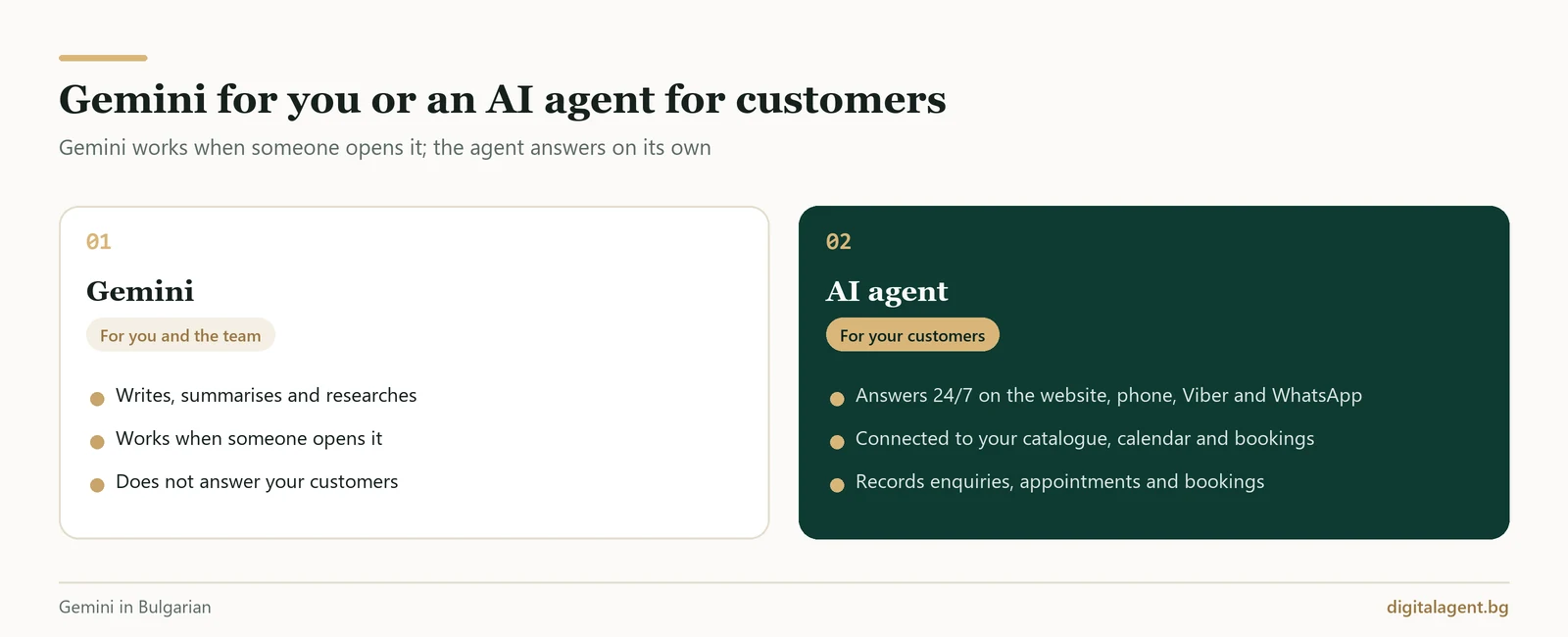
Gemini helps you and your team write, summarise and research, but it only works when one of you opens it. The customer who writes in your website chat at 11 pm, calls on a Saturday or asks for a price on Viber is not talking to your Gemini. To answer them straight away, you need an AI agent that has access to the data in your systems and completes the task: it logs the enquiry, books the appointment or records the reservation. We have explained in detail the difference between an AI assistant, a chatbot and an AI agent.
Google also offers the technology behind Gemini to developers: in September and October 2026, Nano Banana 2.1 and Gemini 4 Argon became available to everyone in the Gemini API (the access through which programmers build Google's models into their own systems). Other companies offer similar language, voice and vision models. We use technologies like these to build AI agents and automations for businesses in Bulgaria. We choose the language model to suit the task and the budget, and we connect the agent to the company's systems, such as its catalogue, calendar or booking system.
| What you do yourself in Gemini | What we build for your business |
|---|---|
| You talk to Gemini Live by voice | AI voice agentthat answers your company phone on a real phone line, speaks natural Bulgarian, replies in about a second and books an appointment or reservation; we arrange a demo call on request |
| Each employee asks Gemini on their personal account and uploads company files themselves | Company AI assistantthat answers your team and your customers based on your documents, catalogues and prices |
| You ask Gemini Notebook questions about your documents | An AI chat agent on your websitethat answers customers based on your prices and terms and logs the enquiry |
| You copy a reply to a foreign customer from Gemini | An agent in Viber and WhatsAppthat replies on its own and sends confirmations in the same chat |
| Gemini in Gmail writes a draft that someone has to send | Automation of routine tasks and documentsthat handles recurring enquiries and confirmations |
| You write messages to guests with Gemini | AI agent for hotelsthat records bookings directly in the hotel's property management system (PMS) and messages guests before, during and after their stay |
| You summarise a long document | AI case management for a law firmthat drafts replies to clients from the case documents, ready for the lawyer to approve |
For the Grand Hotel Resorts by Pulse hotels, we built a round-the-clock AI chat and voice agent connected to Clock PMS. See the Grand Assist case study: an AI chat and voice agent for a hotel chain.
Before you put AI in front of your customers, bear in mind that from 2 August 2026 a chatbot or voice agent must clearly state that it is AI, no later than the first contact (Article 50 of the EU AI Act).
Frequently Asked Questions
Is Gemini free?
How do I set Gemini to Bulgarian?
How much does Gemini Pro (Google AI Pro) cost in Bulgaria?
Is Gemini free for students?
What is Nano Banana and can I use it for free?
Can I put Gemini on my website or on Viber?
If you would like AI to take over some of your conversations with customers, book a free consultation. Together we will choose one process to start with, and you will see how an AI agent would work for your business.
Digital Agent (AI AVTOMATIZATSII OOD) is a specialist agency for AI automation, AI agents and integrations. We build practical, durable solutions for hotels, restaurants, online shops and B2B companies in Bulgaria, Greece and Romania.