Nano Banana is Google's model for creating and editing images in Gemini. You can use it for free, and in Bulgarian, with a Google account: at gemini.google.com, in the Gemini app and in AI Mode in Google Search. As of November 2026, without a subscription you create images with Nano Banana 2 or the faster Nano Banana 2 Lite. The newest version, Nano Banana 2.1 (released on 6 October 2026), comes with every Google AI plan from €4.99 a month, and for Nano Banana Pro the Google AI Pro plan is the safest choice.
The information in this article was checked on 6 November 2026.
The details come from the official pages of the companies concerned and of the European Commission. At Digital Agent we build AI agents for businesses, so at the end we show what AI can take over in your business.
What Nano Banana is and which version is the latest (November 2026)
Nano Banana is a code name under which Google tested its model anonymously on LMArena in August 2025, and the name later became official. Today it is the umbrella name for five models, and Google has not announced anything newer than 2.1, such as a Nano Banana 3.
| Version | Technical name | Released | Where you get it | In short |
|---|---|---|---|---|
| Nano Banana 2.1 | gemini-nano-banana-2.1 (based on Gemini 3.6 Flash) | 6.10.2026 | Gemini with a Google AI plan | The newest: quality, text, consistent characters |
| Nano Banana 2 | Gemini 3.1 Flash Image | 26.02.2026 | Free in Gemini | Several reference images, text in many languages |
| Nano Banana 2 Lite | Gemini 3.1 Flash-Lite Image | 30.06.2026 | Gemini with the Flash-Lite model | The fastest, for simple images |
| Nano Banana Pro | Gemini 3 Pro Image | 20.11.2025 | "Redo with Pro" with a plan | Complex scenes, up to 5 people |
| Nano Banana | Gemini 2.5 Flash Image | 26.08.2025 | Deprecated model in the Gemini API | Shuts down no earlier than 15 Mar 2027 |
In the model card, Google states that in comparisons by raters, 2.1 outperforms Nano Banana 2 and Pro (a rating of 1050 against 990 and 935), and in the Gemini API it is also cheaper than both.
Where to open Nano Banana in Bulgarian and how to avoid unofficial sites
Nano Banana is not a standalone app: Google offers it in Gemini, in Search and in its developer tools, and describes Nano Banana 2 and 2.1 on its official Nano Banana page in Bulgarian.
Gemini. At gemini.google.com or in the apps for Android, iPhone, Mac and Windows (since 10 September 2026), select "Create images" from the tools menu. The feature works in every language and country where Gemini is offered, so it works in Bulgarian in Bulgaria too.
AI Mode. In Google Search, select "+" in the "Ask anything" box and choose "Create images"; you need to be 18 or over and use a personal Google account. More about AI Mode: Google AI Mode: what it is and how to use it.
Unofficial sites. Websites with "nano banana" in their domain name do not belong to Google: the official addresses end in google.com or gemini.google, and you should not enter your password or card details anywhere else.
What is not available in Bulgaria. Gemini avatars with your face and voice are not offered in the European Economic Area (EEA), and images based on your Google Photos and other apps (Personal Intelligence) are only available in the US for now.
Nano Banana for free: limits and which plan unlocks 2.1 and Pro
Yes, you can use Nano Banana for free with a Google account: Nano Banana 2 costs nothing, and you download images in 1K (about 1024 × 1024 pixels for a square image; 2K and 4K are about 2048 and 4096 pixels per side respectively). When Gemini runs on Flash-Lite, the image is made by Nano Banana 2 Lite. Without a plan, Gemini offers two options: automatic model selection for each request, or Flash-Lite.
Google does not publish a number of images per day for the app: since 17 May 2026, the limit for adults has depended on how complex their requests are, and it resets every 5 hours up to a weekly cap; images use it up faster. In AI Mode the cap is 25 images per 24 hours without a plan, 50 with Plus, 100 with Pro and 1,000 with Ultra.
According to the the Google AI plans page for Bulgaria , as of 6 November 2026 Google AI Plus costs €4.99 a month, Pro €21.98 and Ultra from €106.86; we compare what else each plan includes in Gemini in Bulgarian: plans and free access. Google says that every plan unlocks Nano Banana 2.1, 2K downloads and the "Redo with Pro" option in the three-dot menu.
Gemini's help page links Nano Banana Pro to the Pro model, and Google's official pages are inconsistent about whether Plus includes that model: the plans page lists the Flash model for Plus but not Pro, while the help page on models lists Flash-Lite, Flash and Pro. So if you are paying specifically for Nano Banana Pro, the Google AI Pro plan is the safer choice. We covered the student offer (Plus free for a year if you sign up by 31 December 2026) in the same article.
In the Gemini API, which is also available in Bulgaria, there is no free tier for the image models: Nano Banana 2.1 costs $0.0336 per 1K image, $0.0504 per 2K image and $0.113 per 4K image, or about €0.03, €0.045 and €0.10 at the ECB exchange rate of 5 November 2026, excluding VAT. A thousand 1K images come to about €30.
How to use Nano Banana: creating, editing, combining and Cyrillic text
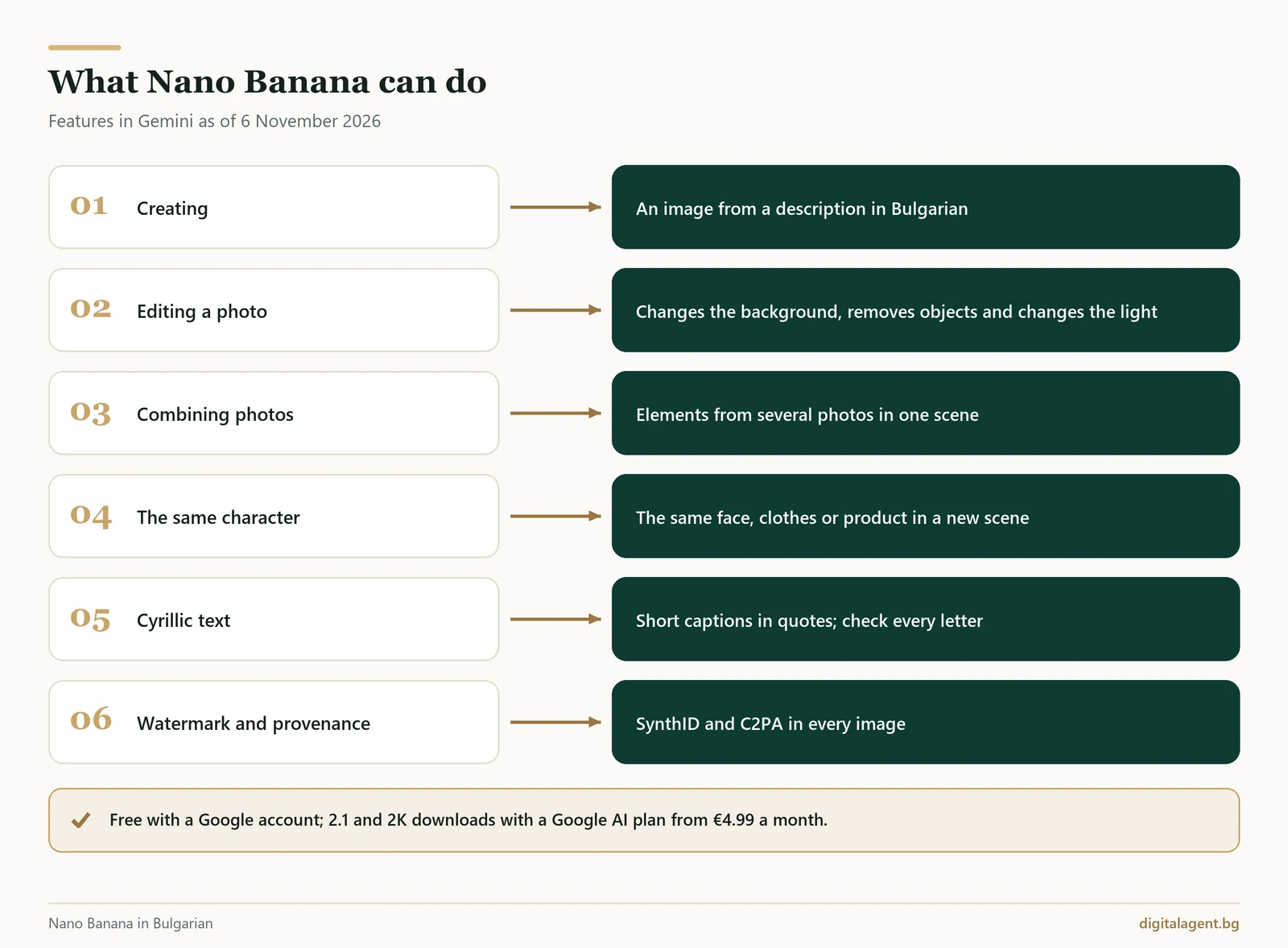
Good AI images start with a clear prompt (the request you type). Google advises starting with a verb ("create", "draw") and specifying the style, the subject, the action, the setting, the composition and the format, for example "9:16 for Stories".
1. Creating. Select "Create images" and describe the scene: "Create a photorealistic image of a cup of coffee on a stone windowsill overlooking Plovdiv's Old Town, morning light, 4:5 format."
2. Editing a photo. Upload the photo with "+" and ask for one change at a time: "change the background to white", "remove the cable from the table", "make it an evening scene". Editing uploaded photos is for adults only, and Nano Banana Pro can also change the camera angle, the focus and the lighting.
3. Combining photos. Upload several photos and say which element goes where: "Put the vase from the first photo on the table in the second." In the Gemini API, Nano Banana 2 and 2.1 accept up to 14 reference images, up to 4 of which can be of people or characters, while Nano Banana 2 Lite is not designed for multiple reference images.
4. The same person or product. Work in a single conversation with a clear reference photo and list what must stay the same: face, hairstyle, clothes, label. Google admits that the likeness is not always perfect, so compare the result with the original, and only use other people's photos with their consent.
5. Text in Cyrillic. Put the exact text in quotation marks and keep it to a few words. Gemini can also write in Cyrillic, but Bulgarian is not among the languages Google recommends for the best results in the Gemini API, and according to Google, small text and long paragraphs are a weak spot of the model. Check every letter and number, and if prices or phone numbers come out wrong, add them in design software. Nano Banana 2 and Pro can also translate the text in a finished image, such as a menu.
Ready-made Nano Banana prompts and little-known features
Replace the text in square brackets, and put any words that should appear in the image in quotation marks. The first two prompts are for personal photos and the rest are for business.
- Old photo. Restore this old photo: remove the scratches and stains, sharpen the details and colourise it naturally. Do not change the faces or poses.
- Caricature from a photo. Make a caricature of the person in the photo: a big head, a small body, [hobby or profession] in the background, bright colours. The face must stay recognisable.
- Product photo. Place the product from the photo on [surface] in [setting], soft morning light, 4:5 format. Do not change its shape, colour or label.
- Social media post. Create a square image for [business]: [scene], in [colours], with empty space at the top. Write only "[up to 5 words]" in large lettering.
- Seasonal campaign. Create a visual for [holiday] for [product] in [style] style, 9:16 format. Then make the same scene in 16:9 for a banner, with the same product, colours and lighting.
- Menu. Make a 2:3 poster for [venue] with the heading "[heading]" and dishes with prices in euros: [dish – price; dish – price]. Light background, legible font, no other text.
- Property or interior. Furnish the empty room in the photo in [style] style as a [living room, bedroom, office]. Keep the walls, windows, floor and perspective.
- Mascot series. This is our mascot: [description or photo]. Show it [scene] with the same face, clothes and colours. Then: Now show the same mascot [new scene].
The customer your menu brings in, who asks at 10 pm whether you have a table free, can get an answer from an AI chat agent that replies to customers straight away, the kind we build for businesses.
Little-known features as of November 2026:
- Drawing on the image (since December 2025). Circle, draw or write something on the image in Gemini to show what should change.
- An image from your camera (since 19 May 2026). In Gemini Live on your phone, show something to the camera and ask for an image based on it.
- Supply up-to-date data yourself. According to the Nano Banana 2.1 model card, its knowledge extends to March 2026, so for an infographic with prices and dates, put the figures in the prompt.
- Pro without a subscription. Google Flow gives adults without a plan 50 credits a day and limited access to Nano Banana Pro.
AI image generators: Nano Banana, ChatGPT Images, Copilot and others
If you are looking for a free AI image generator, ChatGPT Images, Microsoft Copilot and Adobe Firefly also work in Bulgaria. We compare the official terms, not the quality.
| Tool | Free | Paid, per month | Bulgarian | For businesses |
|---|---|---|---|---|
| Nano Banana (Gemini) | Yes | Google AI Plus €4.99 | Yes | Google does not claim ownership of the output |
| ChatGPT Images 2.6 (since 4 Nov 2026) | Yes, with a limit but no published number | Go €6.50, Plus €23 | Yes | Under the EU terms, the output is yours |
| Microsoft Copilot | Yes, with a Microsoft account | Microsoft 365 Personal €9.99 | Yes, for prompts | With a personal account, Copilot is for personal use only |
| Adobe Firefly | Limited free generations per day | From €11.08 incl. VAT | Prompts in over 100 languages | Adobe describes its own Firefly models as commercially safe |
Sources: the companies' official pricing and terms pages, checked on 6 November 2026.
If you are choosing an AI for images, Google presents Nano Banana as strong at editing and combining your own photos and at infographics, while OpenAI has added GIF creation and more precise editing to ChatGPT Images 2.6. We describe ChatGPT's plans in ChatGPT in Bulgarian: prices in euros and images, and the free AI chats in AI in Bulgarian: free chat with artificial intelligence.
Watermarks, SynthID and rights: can a business use the images
Every image from Gemini carries the invisible SynthID watermark and C2PA provenance data (Content Credentials), and by default a visible watermark as well. You can turn off the visible watermark under "Settings" → "Media Watermark"; Gemini's help page on watermarks mentions a plan restriction only for India, South Korea and Vietnam, and SynthID and C2PA remain. To check an image's origin, upload it to Gemini and ask whether it was created with Google AI (up to 10 image checks per 24 hours).
According to the Google's Terms of Service , effective from 30 July 2026, Google does not claim ownership of the content you generate, and the terms do not prohibit its commercial use. However, Google's Generative AI Prohibited Use Policy forbids violating other people's copyright or privacy and misleading people into believing that AI-generated content was created by a human.
Google offers protection against copyright claims only for services on a separate list, such as Gemini in Google Workspace, and not for personal accounts or the Google AI plans. Whether an image is protected by copyright depends on the law of the country concerned, and if you make a logo with AI, check it for similarity to registered trade marks.
Photos of people, GDPR and labelling under the AI Act
For adults, "Keep Activity" is on by default. In that case, uploaded files are also used to train Google's models, while some conversations are reviewed by humans and kept for up to 3 years, even if you delete your activity. A "Temporary Chat" is kept for up to 72 hours and is not used for training.
A photo in which a person can be identified contains personal data under the GDPR, and Google's policies prohibit using personal and biometric data without the consent required by law. On a personal account, do not upload photos of customers, employees or children, or personal documents, and for an advert featuring a specific person you will usually need their consent, and you should be able to prove it.
Article 50 of the EU Artificial Intelligence Act has applied since 2 August 2026. Google marks the images in a machine-readable way, but a business that creates them with AI in its work (a "deployer", in the wording of the Act) must visibly label a "deep fake": an image that resembles existing people, objects, places or events and could pass as real. According to the European Commission's guidelines on Article 50, updated on 5 November 2026, invisible marks such as SynthID are not enough: the label must be visible no later than the first time people see the content.
A deep fake would be, for example, an advert with an AI image that misleads people about what the product really looks like, or an AI influencer in an advert. A real product on an AI-generated background is usually not one, as long as the advert is not misleading, and nor is colour correction or removing passers-by. For a real property that has been virtually furnished, the safest approach is to add the caption "Visualisation created with AI".
Purely personal use falls outside these obligations, but work done by a freelancer or a business does not. Fines can reach €15 million or 3% of annual turnover, with the lower amount applying to small and medium-sized enterprises. This is not legal advice.
What we can build for your business with AI
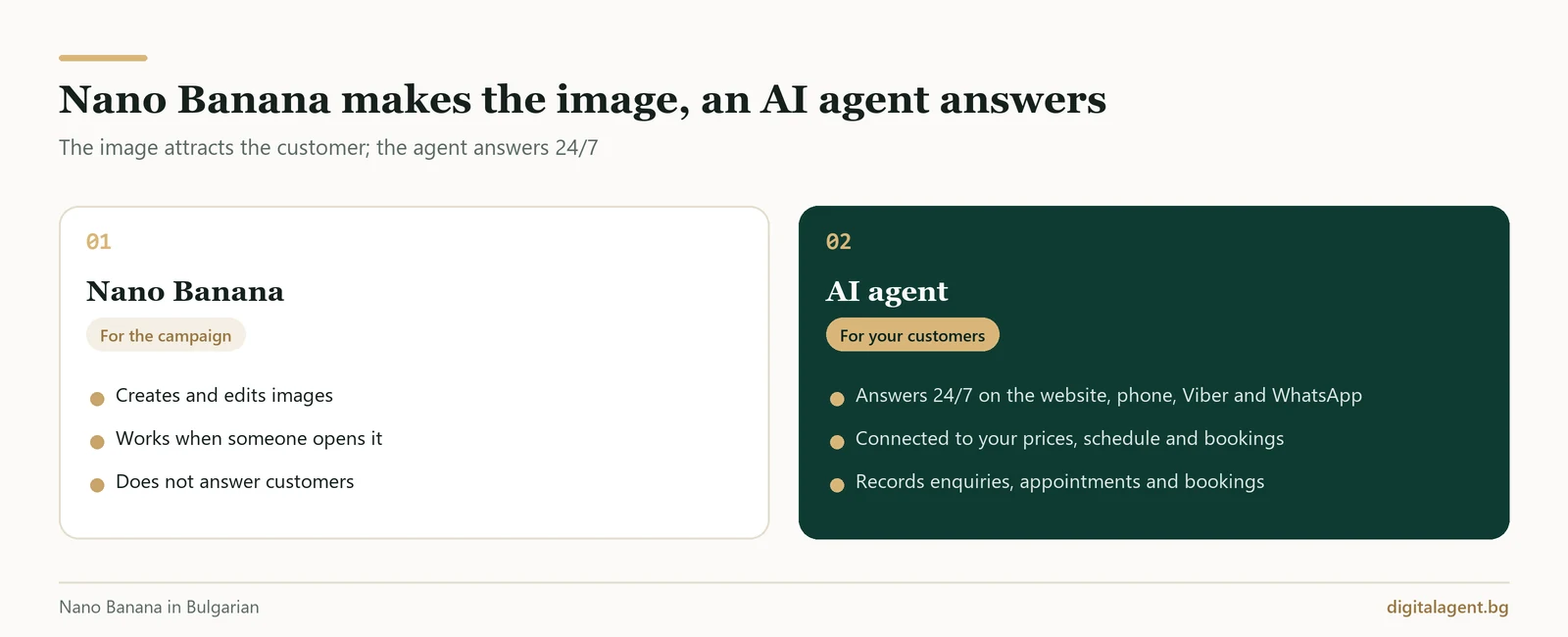
Nano Banana makes the image for your campaign, but it does not answer the customer who sees it and writes to you at 11 pm, calls on a Sunday or asks for a price on Viber. For that customer you need an AI agent that is connected to your prices and systems and completes the task, as we explained in our article on the difference between an AI agent, an assistant and a chatbot. Here is what we build:
- An AI chat agent on your website. It answers straight away based on your prices and terms, guides the customer to an enquiry or booking and saves the conversation with an AI summary.
- AI voice agent on a real phone line. It speaks natural Bulgarian, replies in about a second on average and, when it transfers a call, shows the member of staff what the customer wanted. In the 30 days to 28 October 2026, our voice agents handled nearly 7,000 calls on hotels' phone lines.
- An agent in Viber and WhatsApp. Replies on behalf of your business, and a member of staff can take over the conversation at any time.
- AI agent for hotels. It creates and changes bookings directly in the hotel's property management system (PMS) and sends confirmations by WhatsApp, Viber or email.
- Automation of routine tasks and documents. Takes over confirmations, reminders and the handling of enquiries and documents.
- AI agents and multi-agent systems with Claude. For processes that span several systems: a conversation with the customer, an availability check, a document and approval by a member of staff.
We do not have a public demo number for the voice agent, but on request we arrange a demo call through the free consultation.
Frequently Asked Questions
Can I use Nano Banana for free?
Is there an official Nano Banana app or website?
What is the difference between Nano Banana 2.1, 2, 2 Lite and Pro?
Can Nano Banana write text in Bulgarian?
Can I use Nano Banana images in my company's adverts?
How can I tell whether a photo was made with Nano Banana?
If you would also like AI to answer the customers your images and campaigns attract, book a free consultation: we will choose one process, such as website enquiries or phone calls, and show you how an AI agent would handle it.
Digital Agent (AI AVTOMATIZATSII OOD) is a specialist agency for AI automation, AI agents and integrations. We build practical, durable solutions for hotels, restaurants, online shops and B2B companies in Bulgaria, Greece and Romania.